Keep Your Data Where It Lives: When Zero-Copy Saves Real Money, and When It Quietly Doesn't
TL;DR: Salesforce Zero-Copy data federation lets Data Cloud query Snowflake, BigQuery, or Databricks in place: no ETL, no copies. It saves you from moving data, not from paying for compute. Every federated read bills two meters at once, so for high-frequency reads, copying once is usually cheaper. Match the pattern to read frequency, not to the demo.
The Zero-Copy demo is genuinely impressive. A sales engineer connects Data Cloud to your Snowflake account, and within minutes your warehouse tables appear inside Salesforce, queryable, segmentable, ready to feed Agentforce. No pipelines. No nightly ETL. No "let's migrate your data" project that eats two quarters.
Then someone in the room says the quiet part: "So this is cheaper, right? We're not copying anything."
Not necessarily. Understanding the Salesforce Zero-Copy data federation cost model, the part the demo skips, is the difference between a smart architecture call and a surprise line item your CFO finds in month three. Zero-Copy doesn't make compute free. It moves where you pay for it. And in some cases, it makes you pay twice.
What does Salesforce Zero-Copy actually do?
Zero-Copy federation, now living under the Data 360 brand after Salesforce renamed Data Cloud, lets Data Cloud treat tables in Snowflake, BigQuery, Databricks, or Amazon Redshift as if they were native objects. The data stays in the warehouse. When Salesforce needs it, it fires a live query to the source.
That single capability dismantles the most common reason mid-market companies stall on Salesforce AI: "We'd have to rip out the systems we already pay for." You don't. Your warehouse stays your system of record. Your governance, residency, and lineage stay where your data team built them. Salesforce just borrows the data when it needs it.
For a 10-to-500-person company that spent three years standardizing on Snowflake or BigQuery, that's a real win. You get Agentforce and Data Cloud features without a migration.
So far, this matches the brochure. Here's where judgment enters.
Does Salesforce Zero-Copy actually save money?
No. Zero-Copy is a data-gravity feature, not a cost-savings one: it removes the migration objection without making your compute free.
Here's the reframe that should change how you decide.
Zero-Copy saves you from moving data. It does not save you from paying for compute. Those are two different problems, and the demo deliberately blurs them.
Every time Data Cloud runs a federated query, two meters spin at once:
- Salesforce Data Cloud consumption: credits burned for query processing, segmentation, and activation.
- Your warehouse compute: Snowflake credits or BigQuery bytes scanned, every single time the query fires.
With a traditional copy (ingest the data into Data Cloud once, then refresh incrementally), you pay an ingestion cost one time, after which reads run against Salesforce's own storage: cheap, fast, no warehouse warm-up. With federation, there's no upfront cost to amortize. You pay the toll on both roads on every trip.
That's the two-bill nuance. Copying front-loads cost and then reads cheaply forever. Federating spreads cost across every read, and it doubles the meter while it does.
The Salesforce Zero-Copy data federation cost decision in one diagram
The right question isn't "copy or federate?" in the abstract. It's "how often is this data read, and how fresh does it need to be?"
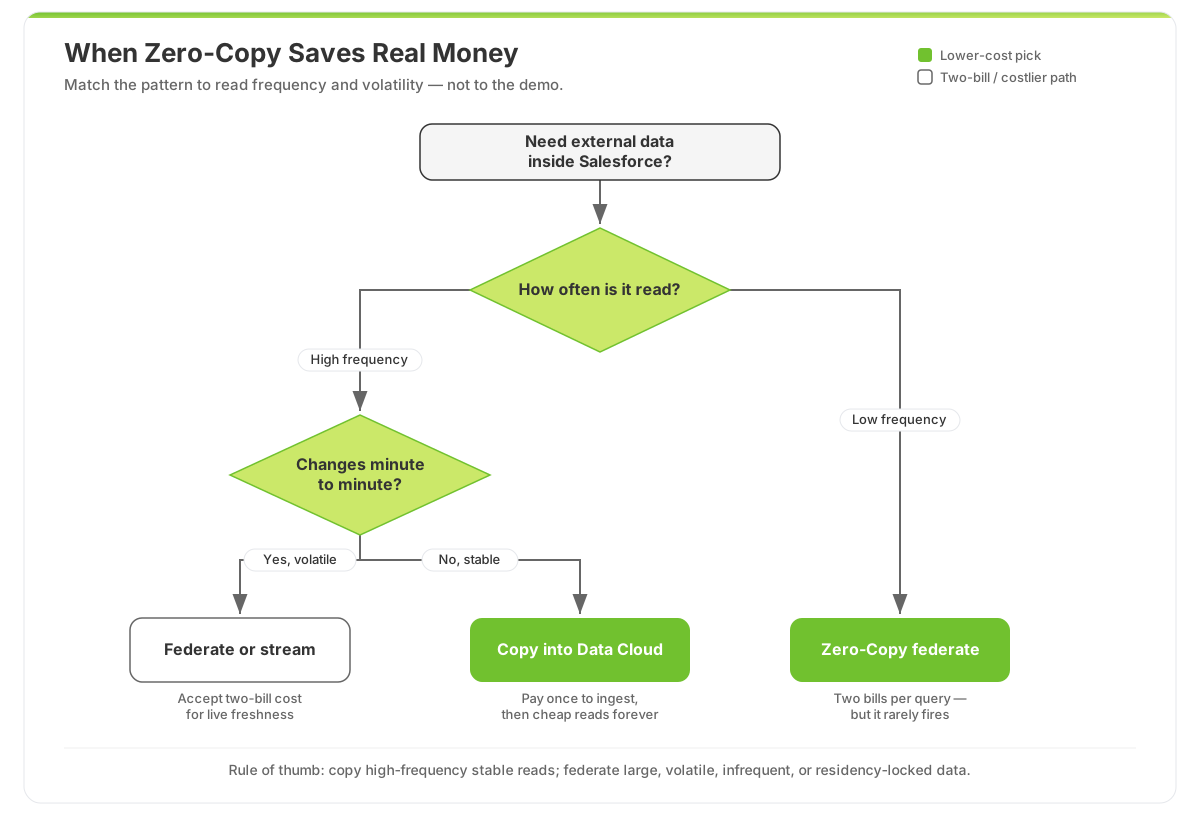 Copy high-frequency, stable reads; federate large, volatile, or low-frequency data. Read frequency decides the cheaper path.
Read it top to bottom. High-frequency reads on stable data is the textbook case for copying. Low-frequency reads on huge, fast-changing tables is the textbook case for federating. Most real orgs are a mix, which is exactly why a blanket "Zero-Copy everything" or "copy everything" policy overpays.
The worked economics (illustrative, but directionally honest)
Numbers make this concrete. The figures below are illustrative (your actual rates depend on your Data Cloud contract and warehouse tier), but the shape of the math is what matters.
| Scenario | Read pattern | Copy (ingest once) | Zero-Copy federate | Cheaper choice |
|---|---|---|---|---|
| Executive dashboard refreshed every 15 min | Very high frequency | ~$X one-time ingest + low read cost | Two meters firing ~96×/day, forever | Copy |
| Agentforce agent looking up order history per chat | High frequency, transactional | Moderate ingest + cheap lookups | Warehouse + Data Cloud charge per resolution | Copy |
| Quarterly cohort analysis on a 4 TB events table | Low frequency, huge volume | Expensive to ingest and store 4 TB | Query in place a few times a quarter | Federate |
| Compliance data that legally can't leave its region | Any | May be disallowed entirely | Stays in source, governed there | Federate |
Notice the agent row. This is the trap that bites SMBs hardest right now. An Agentforce agent that queries federated order data on every customer conversation is a high-frequency read pattern wearing a "real-time AI" costume. Each resolution can quietly trigger a warehouse query and Data Cloud consumption, so your per-resolution economics get worse precisely as adoption gets better. If you're modeling agent costs, pair this with our CFO-ready guide to Agentforce pricing; the federation bill is the variable that flex-credit math usually forgets.
How do you decide whether to copy or federate?
Decide by scoring each source on four factors: read frequency, freshness requirement, volume and volatility, and governance constraints.
Forget "no duplication = cheaper." Ask these instead:
- Read frequency. Reads per day, realistically, including every agent and every dashboard. High and predictable favors copying.
- Freshness requirement. Does the business genuinely need minute-fresh data, or is last night's snapshot fine? Most "real-time" requirements are vanity. Stale-tolerant data is cheaper to copy.
- Volume and volatility. Massive tables that change constantly are painful and expensive to keep re-copying. That's federation's home turf.
- Governance and residency. If data legally or contractually can't move, federation isn't an optimization. It's the only compliant option, cost be damned.
If you can't answer #1 with an actual number, you're not ready to choose. That's a data readiness gap, and it's the same gap that sinks most AI agent projects before they reach production.
✅ Key Takeaways
- Zero-Copy solves data gravity, not compute cost. It removes the migration objection. It does not make queries free.
- Federation means two bills. Every federated query bills Data Cloud and your warehouse, on every read.
- Copy high-frequency, stable reads. They amortize the one-time ingest and then read cheaply forever.
- Federate large, volatile, infrequent, or residency-locked data. That's where staying in place genuinely wins.
- Watch your agents. Per-conversation federated lookups are high-frequency reads in disguise. Model them before you commit.
Frequently Asked Questions
Is Salesforce Zero-Copy cheaper than copying data into Data Cloud?
Sometimes, and only for the right read pattern. Copying front-loads a one-time ingestion cost, then reads cheaply from Salesforce storage. Federation has no upfront cost but bills both Data Cloud and your warehouse on every query. For high-frequency reads, federation usually ends up more expensive. For large, infrequently queried tables, it's the clear winner.
Why do I get "two bills" with Zero-Copy?
Because the data never moves. When Data Cloud federates a query to Snowflake or BigQuery, it consumes Salesforce Data Cloud credits for processing and triggers compute in your warehouse to return the rows. Both providers meter that activity independently. A copy avoids the second bill on reads because the data already lives inside Salesforce.
Does Zero-Copy work with Snowflake, BigQuery, and Databricks?
Yes. Salesforce Data 360 supports Zero-Copy federation with Snowflake, Google BigQuery, Databricks, and Amazon Redshift, sharing data without duplication. The constraint isn't connectivity. It's read frequency and query cost. Connecting is easy; the economics are what require judgment.
Will Zero-Copy slow down my Agentforce agents?
It can. A federated query reaches across to your warehouse and waits on its compute to spin up and return rows, which adds latency versus a local read from Data Cloud storage. For agents that look up the same data on every conversation, copying that hot data into Data Cloud is usually both faster and cheaper.
How do I decide which tables to copy versus federate?
Score each source on read frequency, freshness need, volume and volatility, and governance constraints. High-frequency, stable, latency-sensitive data should be copied. Large, volatile, rarely queried, or residency-locked data should be federated. A short data readiness audit maps every source to the right pattern before you sign a consumption commit.
Get the two-bill math before you sign, not after
Zero-Copy is a legitimately great feature, used for the right read patterns. Used as a blanket policy because "we're not copying anything" sounds cheaper, it turns your warehouse and your Data Cloud bill into a pair of meters running in lockstep on every dashboard refresh and every agent conversation.
Before you commit to a federation architecture or a Data Cloud consumption number, get the real economics modeled against your read patterns. ODS does exactly this in a free Salesforce audit: we map every external source to copy-or-federate, estimate the two-bill cost at your actual query volume, and hand you the architecture that keeps both meters honest. Want to pressure-test the numbers yourself first? Start with our ROI calculator.
If you already know your data foundation is a mess and the federation question is just the symptom, our fixed-price Growth package gets a mid-market org to a clean, agent-ready Data Cloud setup without the open-ended consulting meter. Either way, let's talk before the demo's optimism becomes your invoice.

About the Author
Scott Ohlund
Certified Salesforce Architect with 13+ years of experience. Specialist in AI Agentforce, Data Cloud, and business automation solutions. As founder of Optimum Data Solutions, Scott helps SMB and mid-market teams cut Salesforce tech debt and ship AI-first CRM that actually moves revenue.
Ready to Transform Your Salesforce Experience?
Let's discuss your specific needs and create a customized solution that drives real results for your business.