Salesforce Headless 360, Explained for a 50-Person Company (Not an Enterprise)
TL;DR: Salesforce Headless 360 explained simply: it turns Salesforce into a back-end engine you run through APIs, MCP tools, and AI agents instead of a website your team logs into. For a 50-person company, that means Slack, your site, and an assistant do the work. So you stop paying for screens nobody opens.
Here's the question Salesforce spent 25 years training you not to ask: why should anyone on your team ever log into Salesforce again?
For a quarter-century the answer was obvious, because that's where the data lives, the screens are, and the work happens. Headless 360 quietly detonates that assumption. The platform is now fully callable without the browser UI. Every object, every automation, every AI action is reachable as an API or an MCP tool. The screens became optional.
For an enterprise with 4,000 reps, that's an interesting architecture conversation. For you (a 10-to-500-person company watching the renewal invoice climb), it's an economic one. So let's get Salesforce Headless 360 explained in language that maps to your P&L, not a Dreamforce keynote.
What does Headless 360 actually mean (in plain English)?
In plain English, Headless 360 means Salesforce runs as a back-end engine you call through APIs and MCP tools, with the screens decoupled from the engine and made optional.
"Headless" is a borrowed term. In e-commerce, a headless store separates the engine (inventory, pricing, checkout) from the head (the storefront customers see). You can bolt any front end you want onto the same back end.
Salesforce just did that to itself. The "head" (the blue-and-white screens, tabs, and page layouts) got decoupled from the engine underneath. That engine exposes thousands of API endpoints and, more importantly, a growing set of MCP tools (Model Context Protocol, the open standard that lets AI agents call software directly).
The reframe Salesforce is selling is a "four-systems" model. Translated: your CRM is really four things wearing one trench coat.
- System of Record: where the data sits.
- System of Automation: the flows and rules that move work.
- System of Intelligence: the AI and analytics layer.
- System of Engagement: the surfaces people actually touch.
Headless 360 says the first three can run with no human ever opening a Salesforce tab. The fourth, engagement, moves to wherever your people already live. Slack. Your website. An AI assistant. Email.
The aha: you've been buying screens, not software
Sit with this, because it's the reframe that changes the math: you have been paying per seat for a destination, when what you actually needed was an engine plus the surfaces your team already uses.
A Salesforce seat is, functionally, a license to look at the screens. But on most teams I clean up, half the "users" log in twice a month to update one field a manager nags them about. You're renting them a cockpit so they can flip a single switch.
On the mid-market orgs we clean up, we typically see CRM license utilization land in the 40–60% range. In plain terms: you pay full freight for seats that are half-empty. Headless 360 is the first time the platform itself hands you a clean way to stop.
How the pieces actually connect
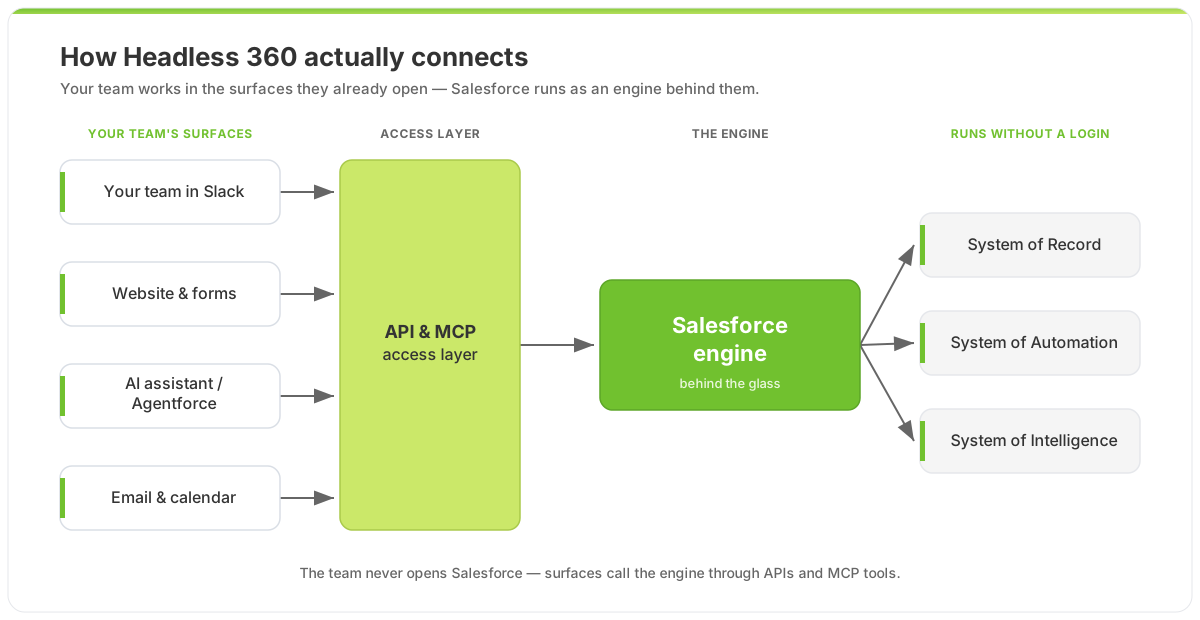 Salesforce Headless 360: your team's everyday surfaces call the engine through APIs and MCP tools. Nobody logs into Salesforce.
The team never opens Salesforce. They ask in Slack, fill out your site, or talk to an assistant. Those surfaces call the engine through the API/MCP layer. The record updates, the automation fires, the AI reasons. All behind the glass.
The four systems, translated to your P&L
| The system | What Salesforce calls it | What it means for your money |
|---|---|---|
| Record | System of Record | One clean source of truth, but you don't need a seat per person to feed it. |
| Automation | System of Automation | Flows run on triggers and API calls, not on someone remembering to click a button. |
| Intelligence | System of Intelligence | Agentforce reads and reasons over your data without a human in the chair. |
| Engagement | System of Engagement | Moves to Slack, your site, and assistants: surfaces with near-zero adoption friction. |
The punchline: only the first three need Salesforce licensing muscle. The fourth, where most of your headcount lives, can run on tools your team already opens without being told to.
What does Headless 360 look like for a 50-person company?
For a 50-person company it looks like Slack lookups, web forms that write straight into the engine, and an AI assistant handling the analysis, with almost nobody logging into Salesforce.
Concrete beats abstract. Three patterns I deploy constantly:
- Slack as the front end. A rep types
/deal Acmein Slack and gets the live record, last touch, and open tasks, then updates the stage right there. No tab. No "I'll do it after this call" (which means never). - Your website as a writer, not just a form. A demo request hits a web form that writes straight into the engine, runs dedupe and routing automation, and books the meeting before a human sees it.
- An AI assistant as the analyst. "Which renewals over $20k are at risk this quarter?" The agent queries the engine through MCP tools and answers in plain English. Nobody built a dashboard. Nobody logged in.
Now the cost math. Take a 50-person company where roughly 20 people "touch" the CRM:
| Log-into-Salesforce model | Headless 360 model | |
|---|---|---|
| Who needs a full CRM seat | Everyone who touches a customer (~20) | Power users and builders only (~5) |
| Where everyone else works | Salesforce screens | Slack, your site, an AI assistant |
| Monthly seat cost | 20 × ~$165/seat | 5 × ~$165 + platform/API + agent usage |
| Annual seat cost (illustrative) | ~$39,600 | ~$9,900 + consumption |
| Adoption risk | High: people dodge the UI | Low: they work where they already are |
Be honest about it: headless does not mean you cancel Salesforce. The engine still costs money, API and platform access still gets licensed, and Agentforce runs on consumption, its own pricing puzzle worth understanding before you commit (I broke that down in Decoding Agentforce Pricing). What changes is the shape of the spend: fewer full cockpits, more engine, more value flowing through surfaces people actually use. That's the deeper argument in Stop Paying for Seats Nobody Logs Into.
Where does going headless bite you?
I won't pretend this is free upside. Going headless exposes everything you've been hiding behind the UI.
When a human is the front end, they silently paper over your mess. They know "the Acme record is the real one, ignore the duplicate." They skip the 300 dead fields. They eyeball bad data and move on. Strip the human out, put an API or an AI agent in their place, and that judgment vanishes. The agent will confidently act on the duplicate. It'll read the dead field. Garbage in becomes garbage out, at machine speed.
This is exactly why so many AI projects faceplant, not because the AI is dumb, but because the data underneath isn't ready. Headless 360 doesn't save a messy org; it exposes every mess you've been ignoring. That's a feature, not a bug. But only if you fix the foundation before you wire the engine to the world.
How to start without betting the company
You don't rip out your UI on a Friday. You pick one high-friction, low-risk surface (usually Slack lookups or a single web-to-record flow) and make that headless. Prove the engine answers correctly. Then expand.
Two prerequisites, in order: clean the data the agents will read, and decide which work genuinely belongs behind the glass versus in front of a human. If you want a structured way to choose, the native-vs-headless decision tree walks the call by complexity, not ambition.
✅ Key Takeaways
- Headless 360 makes Salesforce callable without the browser: every object, flow, and AI action runs through APIs and MCP tools.
- You've been buying screens, not software. Stop renting a cockpit to everyone who flips one switch a month.
- For a lean team, engagement moves to Slack, your site, and AI: surfaces with near-zero adoption friction.
- It's a spend-shape change, not a Salesforce cancellation. Fewer full seats, more engine, more value through tools people use.
- Headless exposes your mess. Clean the data first, or your agents will confidently misinform at machine speed.
Frequently Asked Questions
What is Salesforce Headless 360 in simple terms?
It's running Salesforce as a back-end engine instead of a website your team logs into. The data, automation, and AI become callable through APIs and MCP tools, so other surfaces (Slack, your website, an assistant) drive the platform on your team's behalf. The "head" (the screens) becomes optional.
Does going headless mean we cancel our Salesforce licenses?
No. The engine still costs money. Platform and API access get licensed, and Agentforce runs on consumption pricing. What changes is the mix: fewer full CRM seats for people who barely log in, and more value delivered through cheaper surfaces. You're reshaping the spend, not eliminating Salesforce.
Isn't Headless 360 just for big enterprises?
That's the assumption worth killing. Enterprises have the developers to exploit it, but the economics favor small teams more. A 50-person company feels every unused seat and every adoption gap. Meeting people in Slack and your website, instead of forcing them into a UI they avoid, is a bigger relative win for you than for a 4,000-seat org.
What is MCP and why does it matter for headless?
MCP (Model Context Protocol) is the open standard that lets AI agents call software directly and safely. It matters because it turns Salesforce from "a thing humans click" into "a set of tools an agent can use." That's what lets an AI assistant read and update your CRM without a person (or a brittle custom integration) in the loop.
How risky is going headless for a small team?
The technical risk is low if you start with one surface and expand. The real risk is data quality. When a human is the front end, they quietly fix bad records on the fly. An API or agent won't. It acts on whatever it finds. Clean the data first, and headless is a controlled rollout, not a gamble.
CTA: Before you renew 20 seats, find out how many you actually need
If you're about to re-up a stack of Salesforce seats for people who log in twice a month, pause. Headless 360 means you may be paying for cockpits when you needed an engine. And the gap is real money.
Start with a free Salesforce audit. We'll map which of your "users" actually need a full seat, which workflows belong in Slack or on your website instead, and whether your data is clean enough to safely put an agent in the driver's seat. Want the dollar figure first? Run your numbers through the ROI calculator and see the seat-cost delta for yourself.
When you're ready to execute, our fixed-price Growth and Transformation packages take you from "everyone logs into Salesforce" to "Salesforce runs quietly behind Slack, your site, and an AI assistant", with a 30-day milestone guarantee. No bloated, year-long re-platform. Just the engine, the surfaces your team already opens, and a clean foundation underneath. Tell us where it hurts and we'll scope it straight.

About the Author
Scott Ohlund
Certified Salesforce Architect with 13+ years of experience. Specialist in AI Agentforce, Data Cloud, and business automation solutions. As founder of Optimum Data Solutions, Scott helps SMB and mid-market teams cut Salesforce tech debt and ship AI-first CRM that actually moves revenue.
Ready to Transform Your Salesforce Experience?
Let's discuss your specific needs and create a customized solution that drives real results for your business.