The Salesforce Field Graveyard: What 300 Dead Fields Are Quietly Costing You Every Quarter (and How to Clear Them Out Without Breaking Anything)
TL;DR: How to clean up a messy Salesforce org: start with a field-usage audit, not a delete spree. Most SMB orgs carry 200–400 unused fields that drag page loads, confuse reps, and skew forecasts. Deprecate before you delete: hide and restrict fields for a quarter, then remove only what stays quiet.
Open any Salesforce page layout at a 10–500 person company and start scrolling. You'll pass a Lead_Score_v2__c nobody has filled since 2022, three "Region" fields that disagree with each other, and a checkbox named DO_NOT_USE__c that, reliably, half the team uses anyway. That's the field graveyard. If you want to know how to clean up a messy Salesforce org, this is where you start, because dead fields aren't a cosmetic problem. They're a tax you pay every quarter: in rep time, in bad forecasts, and in the AI project that's going to choke on this data eighteen months from now.
I'm Scott Ohlund. Thirteen years on the platform, and I've cleaned up dozens of these orgs. Here's the reframe most leaders miss, then the exact deprecate-before-delete sequence my team uses to clear hundreds of fields without breaking a single report.
The AHA: You don't have a storage problem. You have a decision-quality problem.
Everyone treats field bloat like clutter in a garage: annoying, harmless, deal with it someday. Wrong frame. Salesforce doesn't charge you meaningfully for 300 extra custom fields, so no line item ever screams. The cost hides in three places that do hit your P&L:
- Rep friction. Every dead field on a layout is something a human eye has to skip, and every duplicate ("which Region do I fill?") is a micro-hesitation that ends in an inconsistent entry.
- Forecast corruption. When three fields half-track the same thing, your reports average garbage. Leadership makes pipeline calls on numbers that were never clean.
- AI poisoning. This is the new one. Agentforce, Einstein, any model you ground on your CRM will happily read
Lead_Score_OLD__cand confidently misinform a customer. A messy schema is the single biggest hidden blocker to AI readiness, a point I make in detail in why AI agent projects fail on data readiness.
The graveyard isn't dead weight sitting in a corner. It's actively making your decisions worse.
What does a Salesforce field graveyard actually cost?
Modeled conservatively, field bloat runs roughly $1,500–$1,800 per rep per year. That's enough to cost a 25-person revenue team north of $40,000 annually.
Vague "tech debt" never gets funded. A number does. So here's the model I use (a $-per-rep-per-year bloat cost), built from conservative assumptions you can adjust for your own org.
| Cost driver | What it looks like | Time / rep / year | Annual cost / rep* |
|---|---|---|---|
| Navigation drag | Scrolling past dead fields on every record | ~15 hrs | ~$675 |
| Data-entry hesitation | "Which of these 3 fields do I use?" | ~8 hrs | ~$360 |
| Reporting rework | Cleaning and reconciling conflicting fields | ~6 hrs | ~$270 |
| Forecast error | Decisions on dirty roll-ups (modeled) | n/a | ~$400 |
| Total | ~29 hrs | ~$1,705 / rep / yr |
*Assumes a ~$45/hr blended loaded cost for a sales/ops user.
Run that across a 25-person revenue team and the graveyard is quietly costing you north of $40,000 a year, before you count the strategic cost of a forecast leadership doesn't fully trust. Suddenly "cleanup" reads like what it actually is: an ROI project. If you need to sell it internally, I wrote the playbook in how to fund tech-debt remediation as a project your CFO will approve.
How do you find unused Salesforce fields?
You can't trust your gut on which fields are dead. The DO_NOT_USE__c example proves it. You need forensics. My audit triangulates three sources so nothing safe gets deleted and nothing dead survives.
1. Salesforce Optimizer (the free starting point)
Salesforce's built-in Optimizer report flags fields with low or zero population, unused custom fields, and fields not on any page layout. It's the fastest way to get a candidate list. It is not the final word. Optimizer tells you a field is empty, not whether something downstream still reads it.
2. Page-layout and field-population forensics
For each candidate, I check actual population rate (what percent of records hold a value) and whether it even appears on a layout. A field that's 0.4% populated and on zero layouts is an obvious candidate. A field that's 2% populated but feeds an executive dashboard is not. Population alone lies.
3. Report and automation dependency mapping
This is the step amateurs skip and then break production. Before any field moves, I trace every dependency: reports, list views, flows, validation rules, Apex, formula fields, and integrations. A "dead" field referenced by a nightly Apex job or a billing integration is a landmine. The dependency map is the difference between a clean cleanup and a Monday-morning outage. This is exactly the hidden coupling that over-customization creates. More in stop over-customizing Salesforce.
How do you delete Salesforce fields without breaking reports?
Here's the core method. Never go straight from "looks unused" to "deleted." You quarantine first. Deleted fields in Salesforce are recoverable for only 15 days , and dependency surprises often surface weeks later at quarter close. The sequence:
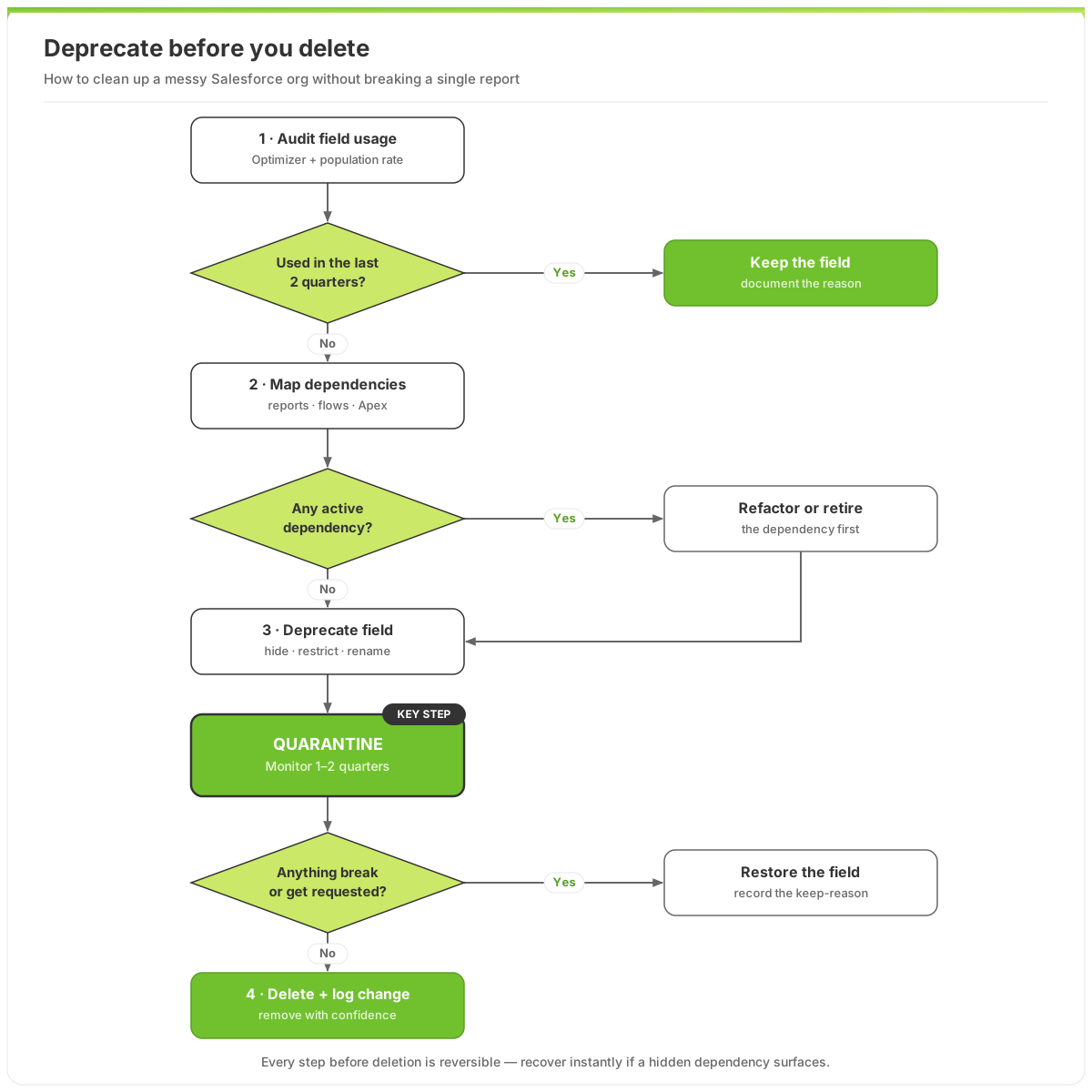 The deprecate-before-delete sequence: quarantine fields for a quarter or two so nothing breaks before you delete.
The quarantine step is the whole game. By hiding the field from layouts and restricting field-level security instead of deleting it, you make it functionally invisible, but instantly recoverable if a flow throws an error or a controller emails asking where "their" field went. Rename it with a loud prefix like ZZZ_DEPRECATED_ so anyone who stumbles on it knows the status. After one to two quiet quarters, you delete with confidence and a logged change record.
✅ Key Takeaways
- Field bloat is a decision-quality and AI-readiness problem, not a tidiness one: it corrupts forecasts and poisons future agents.
- Put a number on it: model the cost at roughly $1,500–$1,800 per rep per year so cleanup gets funded like the ROI project it is.
- Triangulate before touching anything: Optimizer + population rate + full dependency map. Population alone lies.
- Deprecate, then delete. Hide and restrict for 1–2 quarters; remove only what stays silent.
- Map dependencies first: reports, flows, Apex, and integrations are where "harmless" deletes become Monday outages.
Frequently Asked Questions
How do I know which Salesforce fields are actually safe to delete?
A field is safe to delete only when it clears three tests: low or zero population over the last two quarters, no page-layout presence, and zero active dependencies across reports, list views, flows, validation rules, Apex, and integrations. Optimizer surfaces candidates, but the dependency map decides. If any test fails, deprecate and quarantine instead of deleting.
Won't deleting fields break my reports and dashboards?
It can, which is exactly why you map report and automation dependencies before removing anything, and why you deprecate first. Hiding a field and restricting its security for a quarter exposes any hidden dependency safely and reversibly. Only fields that stay silent through quarantine get deleted, so production reports never break by surprise.
How long does cleaning up a messy Salesforce org take?
For a typical SMB org with a few hundred dead fields, the audit and deprecation pass takes a few focused weeks; the quarantine window then runs one to two quarters before final deletes. You capture most of the rep-friction and reporting benefit the moment fields leave the layouts. The wait only protects the final delete.
Why does field bloat matter so much for AI and Agentforce?
Because agents ground their answers on your schema. Duplicate, ambiguous, and abandoned fields make a model confidently wrong: it can't tell Region__c from Region_OLD__c. Clean fields are a prerequisite for trustworthy AI, which is why we treat a data readiness audit and field cleanup as the same foundational work.
Can't I just hide the fields and leave them forever?
You can, and hiding captures most of the rep-time savings. But left forever, deprecated fields still clutter the metadata your admins, integrations, and future AI tools must reason over, and Salesforce enforces a hard cap on custom fields per object. Deprecation is the safe pause; deletion is the finish line.
CTA: Clear the graveyard before it shows up in your AI bill
Field bloat is the cheapest expensive problem you have. It doesn't crash anything, so it never makes the priority list, and then it silently taxes every rep, skews every forecast, and waits to sabotage your first Agentforce project. You don't have to live with it, and you shouldn't pay for a six-month enterprise engagement to fix it.
Start with a free, no-obligation look: our free Salesforce audit runs the Optimizer-plus-dependency pass and hands you a ranked list of what's safe to archive versus delete, with the bloat cost attached so you can take a real number to your CFO. If the graveyard is deep and you want it cleared fast and safely, that's precisely what our fixed-price Emergency package ($4,997, 30-day milestone guarantee) is built to do: deprecate-before-delete, dependencies intact, reports untouched.
Bring us your messiest org. We've cleaned up worse, and we'll prove the ROI before you spend a dollar on the cleanup itself. Talk to us.

About the Author
Scott Ohlund
Certified Salesforce Architect with 13+ years of experience. Specialist in AI Agentforce, Data Cloud, and business automation solutions. As founder of Optimum Data Solutions, Scott helps SMB and mid-market teams cut Salesforce tech debt and ship AI-first CRM that actually moves revenue.
Ready to Transform Your Salesforce Experience?
Let's discuss your specific needs and create a customized solution that drives real results for your business.